
How to Use an Oscillating Multi Tool for DIY Projects
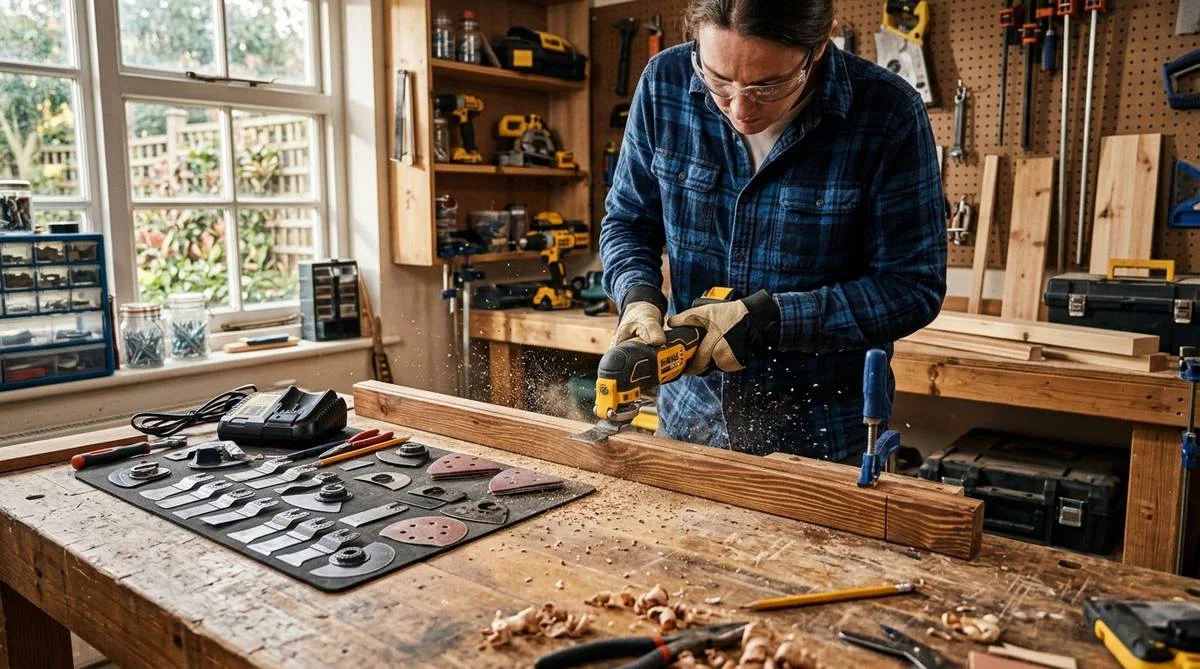
An oscillating multi tool might be the most underrated power tool you can own. It cuts, sands, scrapes, and grinds, and it fits into tight spaces where a circular saw or a reciprocating saw would never work. If you just bought one and the box of blades looks confusing, or you have had one sitting in the garage for months because you were not sure what to do with it, this is the breakdown you need.
The short answer: attach the right blade, set the speed, and let the tool do the work. But the difference between someone who gets clean results and someone who burns through blades in a week comes down to a few specific techniques. Here is everything you actually need to know.
What Is an Oscillating Multi Tool and How Does It Work
An oscillating multi tool works by vibrating the attached blade or pad side to side at extremely high speed, typically between 10,000 and 20,000 oscillations per minute. That rapid back-and-forth motion (the arc is only about 3 to 4 degrees) lets the tool cut through wood, metal, drywall, grout, and plastic without the kickback you get from spinning blades.
The tool itself is compact. Most corded models run around 3 to 4 amps, and cordless versions from brands like DeWalt, Milwaukee, and Makita use 18V or 20V batteries. A decent entry-level oscillating tool costs $50 to $80 in 2026, while pro-grade cordless models from Fein or Milwaukee run $150 to $250. That price range makes it accessible whether you are building out a full workshop or just need something for occasional home repairs.
What makes this tool special is versatility. With the right blade, you can flush-cut a door jamb for new flooring, remove old grout from tile joints, sand a cabinet in a tight corner, or scrape dried adhesive off a subfloor. No other single tool covers that range.
Choosing the Right Oscillating Tool Blade
The blade you attach determines what the tool can actually do. Most oscillating tools come with a starter set of 3 to 5 blades, but understanding which one to grab for each job saves time and prevents wrecked blades.
Wood Cutting Blades
These have wide, flat teeth designed for plunge cuts and flush cuts in wood, plywood, and PVC. A standard wood blade costs $3 to $8 each. Use these for trimming door casings, cutting out sections of baseboard, or making notches in wooden studs for wiring. The teeth are spaced wider than metal-cutting blades, which clears sawdust faster and prevents binding.
Bi-Metal Blades for Wood and Metal
Bi-metal blades handle nails, screws, copper pipe, and thin sheet metal alongside wood. They cost $5 to $12 each and last longer than standard wood blades. If you are cutting into a wall and might hit a nail or a metal bracket, use a bi-metal blade instead of gambling on a wood-only blade. The teeth are finer and the blade material is harder.
Carbide and Diamond Blades
For grout removal, cement board, or hardened steel, carbide-grit or diamond-edge blades are the only option that holds up. Expect to pay $10 to $25 per blade. A carbide segment blade chews through tile grout for regrouting jobs, while a diamond-coated half-moon blade handles cement backer board cuts when you are tiling a shower. These are specialty blades, so you will not need them every day, but when you do, nothing else works.
Sanding Pads
A triangular sanding pad attaches to the oscillating tool and turns it into a detail sander. The pad accepts hook-and-loop sandpaper in various grits, from 60-grit for rough shaping to 220-grit for finish work. This is perfect for sanding inside corners, between stair spindles, or on furniture edges where a random orbit sander cannot reach. A sanding pad accessory costs around $5 to $10, and sandpaper packs run $8 to $15 for 20 sheets.
Scraping Blades
Rigid scraping blades pop off old caulk, dried thinset, adhesive residue, and paint. They come in flat and bent profiles. A flat scraper works for removing vinyl flooring adhesive from a subfloor, while a bent scraper gets under old window glazing. These cost $4 to $10 each. If you have ever spent an hour with a putty knife trying to remove dried construction adhesive, a scraping blade on an oscillating tool will change how you approach that job.
How to Make a Plunge Cut
Plunge cutting is one of the main reasons people buy an oscillating multi tool. Unlike a jigsaw, which needs a drilled starter hole or an edge to start from, an oscillating tool blade can cut straight into a flat surface.
Here is how to do it right:
- Mark your cut line clearly with a pencil or tape.
- Tilt the tool so the blade tip contacts the surface at about a 30 to 45 degree angle.
- Turn on the tool at medium speed.
- Let the blade teeth bite in gradually. Do not force downward pressure.
- Once the blade has penetrated about half an inch, slowly rock the tool upright until the blade is perpendicular to the surface.
- Follow your cut line at a steady pace.
The biggest mistake people make with plunge cuts is pushing too hard. The oscillating motion does the cutting. Extra downward pressure just creates friction, overheats the blade, and dulls the teeth faster. Let the weight of the tool plus light guidance do the work.
For cutting a rectangular hole in drywall (like for an electrical box), plunge in at one corner, cut along the line to the next corner, then repeat for all four sides. The oscillating tool gives you much more control than a drywall saw, and the cut edges come out cleaner. If you are doing any kind of drywall patching or repair work, this technique is a must-know.
Flush Cutting Door Jambs and Trim
This is probably the single most popular use for an oscillating multi tool. When you install new flooring (hardwood, laminate, or vinyl plank), the planks need to slide under the door jambs and casings. Instead of removing all the trim, you undercut it.
Place a scrap piece of your new flooring material on the subfloor right next to the door jamb. Rest the oscillating tool blade flat on top of that scrap piece. This sets the exact cutting height. Turn on the tool at medium-high speed and push the blade slowly into the jamb, keeping it flat on the flooring sample. The blade slices through the wood casing, and your new floor plank slides right under.
A tip that saves a lot of headache: use a wider blade (not the narrow detail blade) for flush cuts against flat surfaces. The wider blade keeps stable and does not wobble during the cut. Also, put painter's tape on the jamb above the cut line to reduce splintering on the visible portion.
Speed Settings and When to Adjust Them
Most oscillating multi tools have a variable speed dial, typically ranging from 1 (slowest) to 6 (fastest), or they show the actual OPM (oscillations per minute) range.
- Low speed (level 1-2): Scraping adhesive, removing caulk, working on delicate materials like softwood trim. Low speed gives you more control and less vibration.
- Medium speed (level 3-4): General wood cutting, plunge cuts, sanding. This is your default for most tasks. It balances cut speed with blade life.
- High speed (level 5-6): Cutting through harder materials like hardwood, metal, or grout. The faster oscillation keeps the teeth engaged and prevents the blade from grabbing. Higher speed also works for rough sanding with coarse grit.
A rule of thumb: start at medium speed and adjust based on how the material responds. If the blade is bogging down or chattering, bump up the speed. If you are losing control or the material is chipping, slow it down.
Common Mistakes That Wreck Blades and Waste Time
After using an oscillating tool on dozens of renovation projects, these are the mistakes that cost the most money and frustration:
Using a Dull Blade Too Long
A dull oscillating tool blade does not just cut slower. It generates more heat, which warps the blade and can scorch the material. Wood cutting blades last about 10 to 20 minutes of actual cutting time, depending on the material. When the cut starts feeling slow and you smell burning wood, swap the blade. Trying to squeeze extra life out of a dead blade always costs more time than the $5 replacement.
Wrong Blade for the Material
Using a wood blade to cut through a nail will destroy the teeth instantly. If you are cutting into anything where hidden metal is possible (walls, old floors, painted surfaces with screws behind them), always default to a bi-metal blade. The slight extra cost per blade is nothing compared to burning through three wood blades on one cut.
Excessive Downward Pressure
This comes up again because it is the single most common beginner error. The oscillating motion does the cutting. Pressing down harder does not make it cut faster. It makes the motor work harder, shortens blade life, and can actually slow the cut because the teeth cannot clear debris properly.
Ignoring Dust Collection
Sanding with an oscillating tool generates fine dust. Most oscillating tools have a dust port attachment or at least accept a vacuum adapter. Hook it up. Fine wood dust is not just messy, it is a respiratory hazard, especially in enclosed spaces. A $10 dust adapter saves you from breathing problems and a major cleanup.
Best Oscillating Multi Tool Brands in 2026
The market has a clear tier structure:
- Budget ($40 to $70): Ryobi, Hart, and Wen. These work fine for occasional projects. Ryobi's 18V ONE+ model is a solid pick if you already own Ryobi batteries.
- Mid-range ($80 to $150): DeWalt DCS354B, Makita XMT03Z, Bosch GOP18V-28N. Better motors, smoother vibration control, and tool-free blade change systems. The DeWalt uses a quick-change system that lets you swap blades in seconds without an Allen wrench.
- Pro ($150 to $300): Fein MultiMaster, Milwaukee M18 FUEL, Festool Vecturo. Fein literally invented the oscillating tool in 1967 and still makes the smoothest-running models. Milwaukee's brushless motor delivers the most power in a cordless package. These are for daily professional use.
If you are buying your first oscillating multi tool for home projects, the DeWalt DCS354B (bare tool around $99, with battery kit around $150) hits the sweet spot of performance, blade availability, and price. Starlock blade compatibility is becoming the standard, so look for tools that accept Starlock blades if you want the widest accessory selection.
Real Projects Where an Oscillating Tool Saves Hours
Here are specific situations from actual home improvement work where pulling out the oscillating tool was the right call:
- Removing old grout between bathroom tiles for regrouting. A carbide blade in the oscillating tool removes grout 5x faster than a manual grout saw, and with way more precision than a rotary tool. If you are recaulking your bathtub or regrouting tile, the oscillating tool handles the removal step.
- Cutting a doorway opening in an existing wall. Mark the outline, plunge cut at the corners, and follow the lines. Clean, controlled cuts without the aggressive kickback of a reciprocating saw.
- Trimming the bottom of a door that rubs on new flooring. Clamp a straightedge as a guide, set the oscillating tool blade against it, and shave off the exact amount needed.
- Removing old window caulk and glazing compound. A scraping blade peels off decades of dried caulk in minutes. By hand, the same job takes an hour per window.
- Sanding tight corners on kitchen cabinet refinishing projects. The triangular sanding pad reaches corners, edges, and profiles that belt sanders and orbital sanders miss completely.
Safety Tips You Should Actually Follow
Oscillating tools are safer than most power tools because there is no spinning blade, no kickback risk, and the oscillation speed means even accidental skin contact is unlikely to cause a deep cut. That said, a few things still matter:
- Wear safety glasses. Small debris flies unpredictably, especially when cutting metal or scraping dried adhesive.
- Use hearing protection for extended use. The high-pitched buzzing frequency is more fatiguing to your ears than the deeper rumble of a circular saw.
- Wear a dust mask when sanding. Connect the dust collection port if your model has one.
- Let the blade cool between heavy cuts. If you feel heat radiating off the blade or smell burning, pause for 30 seconds. Hot blades dull dramatically faster.
- Secure your workpiece. Clamp it to a bench or sawhorse. The oscillation vibration can walk an unsecured piece right off the edge.
FAQ
Can an oscillating tool cut through nails?
Yes, but only with a bi-metal or carbide blade. A standard wood blade will lose its teeth on the first nail. Bi-metal blades handle finish nails and thin screws without issue. For hardened steel nails or bolts, use a carbide-tipped blade.
How long do oscillating tool blades last?
A standard wood-cutting blade lasts 10 to 20 minutes of continuous cutting. Bi-metal blades last 2 to 3 times longer. Carbide blades can last weeks of intermittent use. Blade life depends heavily on the material hardness and whether you are using the right speed setting.
Is an oscillating tool better than a Dremel rotary tool?
They handle different jobs. A Dremel excels at precision detail work, engraving, and polishing small areas. An oscillating multi tool is better for construction-scale tasks: cutting trim, removing flooring, sanding large flat areas, and scraping adhesive. If you do home renovation work, the oscillating tool is more useful day to day.
What is the Starlock blade system?
Starlock is a blade mounting standard developed by Bosch and Fein that uses a snap-in 3D attachment instead of the older universal clamp system. Starlock blades transfer power more efficiently and stay more stable during cuts. Most mid-range and pro oscillating tools made after 2020 accept Starlock blades, though many also accept universal-fit blades through an adapter.
Can I use an oscillating tool to cut tile?
You can cut small sections of ceramic tile and grout with a diamond or carbide blade. It is not a replacement for a wet tile saw on full tiles, but for cutting notches, trimming edges, or removing grout lines, it works well. Keep the speed on medium-high and let the abrasive coating do the work without forcing the blade.
Post a Comment for "How to Use an Oscillating Multi Tool for DIY Projects"
Post a Comment